
Raspberry
Functions
Section titled “Functions”Retrieve an ADC device that has been loaded.
Parameters:
| Name | Type | Description |
|---|---|---|
| name | String | The name of the ADC device. |
Return Type: Adc Device
Returns: The adc_device pointer if found; otherwise, nullptr.
Signatures:
adc_device adc_device_named(const string &name)public static AdcDevice SplashKit.AdcDeviceNamed(string name);def adc_device_named(name):function AdcDeviceNamed(const name: String): AdcDeviceCloses an ADC device given its pointer.
Parameters:
| Name | Type | Description |
|---|---|---|
| adc | Adc Device | The ADC device to close. |
Signatures:
void close_adc(adc_device adc)public void AdcDevice.Close();public static void SplashKit.CloseAdc(AdcDevice adc);def close_adc(adc):procedure CloseAdc(adc: AdcDevice)Closes an ADC device given its name.
Parameters:
| Name | Type | Description |
|---|---|---|
| name | String | The name of the ADC device to close. |
Signatures:
void close_adc(const string &name)public static void SplashKit.CloseAdc(string name);def close_adc_named(name):procedure CloseAdc(const name: String)Closes all ADC devices that have been opened.
Signatures:
void close_all_adc()public static void SplashKit.CloseAllAdc();def close_all_adc():procedure CloseAllAdc()Checks if an ADC device with the given name has been loaded.
Parameters:
| Name | Type | Description |
|---|---|---|
| name | String | The name used to identify the ADC device. |
Return Type: Boolean
Returns: true if an ADC device with the supplied name exists.
Signatures:
bool has_adc_device(const string &name)public static bool SplashKit.HasAdcDevice(string name);def has_adc_device(name):function HasAdcDevice(const name: String): BooleanOpens an ADC device with the specified name and type. Defaults to bus 1 and address 0x48.
Parameters:
| Name | Type | Description |
|---|---|---|
| name | String | The name of the ADC device to open. |
| type_of_adc | Adc Type | The type of ADC device (e.g., ADS7830, PCF8591). |
Return Type: Adc Device
Returns: A valid adc_device on success, or nullptr on failure.
Signatures:
adc_device open_adc(const string &name, adc_type type_of_adc)public static AdcDevice SplashKit.OpenAdc(string name, AdcType typeOfAdc);public AdcDevice(string name, AdcType typeOfAdc);def open_adc(name, type_of_adc):function OpenAdc(const name: String; typeOfAdc: AdcType): AdcDeviceLoads an ADC device on the specified I2C bus at a given address.
Parameters:
| Name | Type | Description |
|---|---|---|
| name | String | The name to assign this ADC device. |
| bus | Integer | The I2C bus number. |
| address | Integer | The I2C address of the ADC device. |
| type_of_adc | Adc Type | The type of ADC device (e.g., ADS7830, PCF8591). |
Return Type: Adc Device
Returns: A valid adc_device on success, or nullptr on failure.
Signatures:
adc_device open_adc(const string &name, int bus, int address, adc_type type_of_adc)public static AdcDevice SplashKit.OpenAdc(string name, int bus, int address, AdcType typeOfAdc);public AdcDevice(string name, int bus, int address, AdcType typeOfAdc);def open_adc_with_bus(name, bus, address, type_of_adc):function OpenAdc(const name: String; bus: Integer; address: Integer; typeOfAdc: AdcType): AdcDeviceReads an 8-bit value from the specified ADC channel on the device.
Parameters:
| Name | Type | Description |
|---|---|---|
| adc | Adc Device | The ADC device to read from. |
| channel | Adc Pin | The channel number to read (range depends on ADC type). |
Return Type: Integer
Returns: The ADC conversion value (0–255), or -1 on error.
Signatures:
int read_adc(adc_device adc, adc_pin channel)public int AdcDevice.Read(AdcPin channel);public static int SplashKit.ReadAdc(AdcDevice adc, AdcPin channel);def read_adc(adc, channel):function ReadAdc(adc: AdcDevice; channel: AdcPin): IntegerReads an 8-bit value from the specified ADC channel on the device using its name.
Parameters:
| Name | Type | Description |
|---|---|---|
| name | String | The ADC name string to close. |
| channel | Adc Pin | The channel number to read (range depends on ADC type). |
Return Type: Integer
Returns: The ADC conversion value (0–255), or -1 on error.
Signatures:
int read_adc(const string &name, adc_pin channel)public static int SplashKit.ReadAdc(string name, AdcPin channel);def read_adc_named(name, channel):function ReadAdc(const name: String; channel: AdcPin): IntegerConverts an ASCII character to a binary value to be used with the Quad 14-segment display module (HT16K33 backpack).
Parameters:
| Name | Type | Description |
|---|---|---|
| ascii_char | Char | The ascii character to be converted to a 16-bit binary value. |
Return Type: undefined
Returns: The binary value used to display a character on the 14-segment display.
Signatures:
unsigned short get_alpha_font_14_seg(char ascii_char)public static ushort SplashKit.GetAlphaFont14Seg(char asciiChar);def get_alpha_font_14_seg(ascii_char):function GetAlphaFont14Seg(asciiChar: Char): WordUsage: {</>}
Converts the specified pin value to an integer, to use in calculations.
Parameters:
| Name | Type | Description |
|---|---|---|
| value | Gpio Pin Value | The pin to read the value from. |
Return Type: Integer
Returns: The pin value as an integer.
Signatures:
int gpio_pin_to_int(gpio_pin_value value)public static int SplashKit.GpioPinToInt(GpioPinValue value);def gpio_pin_to_int(value):function GpioPinToInt(value: GpioPinValue): IntegerChecks if the system has GPIO capabilities.
Return Type: Boolean
Returns: true if the system has GPIO capabilities, false otherwise.
Signatures:
bool has_gpio()public static bool SplashKit.HasGpio();def has_gpio():function HasGpio(): BooleanThis function should be called when you are finished using the GPIO library. It sets all pin modes to INPUT and values to LOW.
Signatures:
void raspi_cleanup()public static void SplashKit.RaspiCleanup();def raspi_cleanup():procedure RaspiCleanup()Usage: {</>}
This function retrieves the mode of the specified pin.
Parameters:
| Name | Type | Description |
|---|---|---|
| pin | Gpio Pin | The pin to get the mode for. |
Return Type: Gpio Pin Mode
Returns: The mode of the pin.
Signatures:
gpio_pin_mode raspi_get_mode(gpio_pin pin)public static GpioPinMode SplashKit.RaspiGetMode(GpioPin pin);def raspi_get_mode(pin):function RaspiGetMode(pin: GpioPin): GpioPinModeThis function retrieves the pulse width for the specified pin.
Parameters:
| Name | Type | Description |
|---|---|---|
| pin | Gpio Pin | The pin to get the pulse width for. |
Return Type: Integer
Returns: The pulse width of the pin.
Signatures:
int raspi_get_servo_pulsewidth(gpio_pin pin)public static int SplashKit.RaspiGetServoPulsewidth(GpioPin pin);def raspi_get_servo_pulsewidth(pin):function RaspiGetServoPulsewidth(pin: GpioPin): IntegerOpens I2C communication on selected address. It will return -1 if not using Raspberry Pi.
Parameters:
| Name | Type | Description |
|---|---|---|
| bus | Integer | The bus of the I2C device. |
| address | Integer | The address of the I2C device. |
Return Type: Integer
Returns: The handle referencing this particular connection.
Signatures:
int raspi_i2c_open(int bus, int address)public static int SplashKit.RaspiI2cOpen(int bus, int address);def raspi_i2c_open(bus, address):function RaspiI2cOpen(bus: Integer; address: Integer): IntegerUsage: {</>}
Writes data to specified I2C connection.
Parameters:
| Name | Type | Description |
|---|---|---|
| handle | Integer | The reference for a specific I2C connection. |
| data | Integer | The data to send. |
Signatures:
void raspi_i2c_write(int handle, int data)public static void SplashKit.RaspiI2cWrite(int handle, int data);def raspi_i2c_write(handle, data):procedure RaspiI2cWrite(handle: Integer; data: Integer)Usage: {</>}
Writes 8-bit (1 byte) or 16-bit (2 bytes) data to specified I2C connection.
Parameters:
| Name | Type | Description |
|---|---|---|
| handle | Integer | The reference for a specific I2C connection. |
| reg | Integer | The register to send the data to |
| data | Integer | The data to send. |
| bytes | Integer | The number of bytes to be transferred. |
Signatures:
void raspi_i2c_write(int handle, int reg, int data, int bytes)public static void SplashKit.RaspiI2cWrite(int handle, int reg, int data, int bytes);def raspi_i2c_write_data(handle, reg, data, bytes):procedure RaspiI2cWrite(handle: Integer; reg: Integer; data: Integer; bytes: Integer)Usage: {</>}
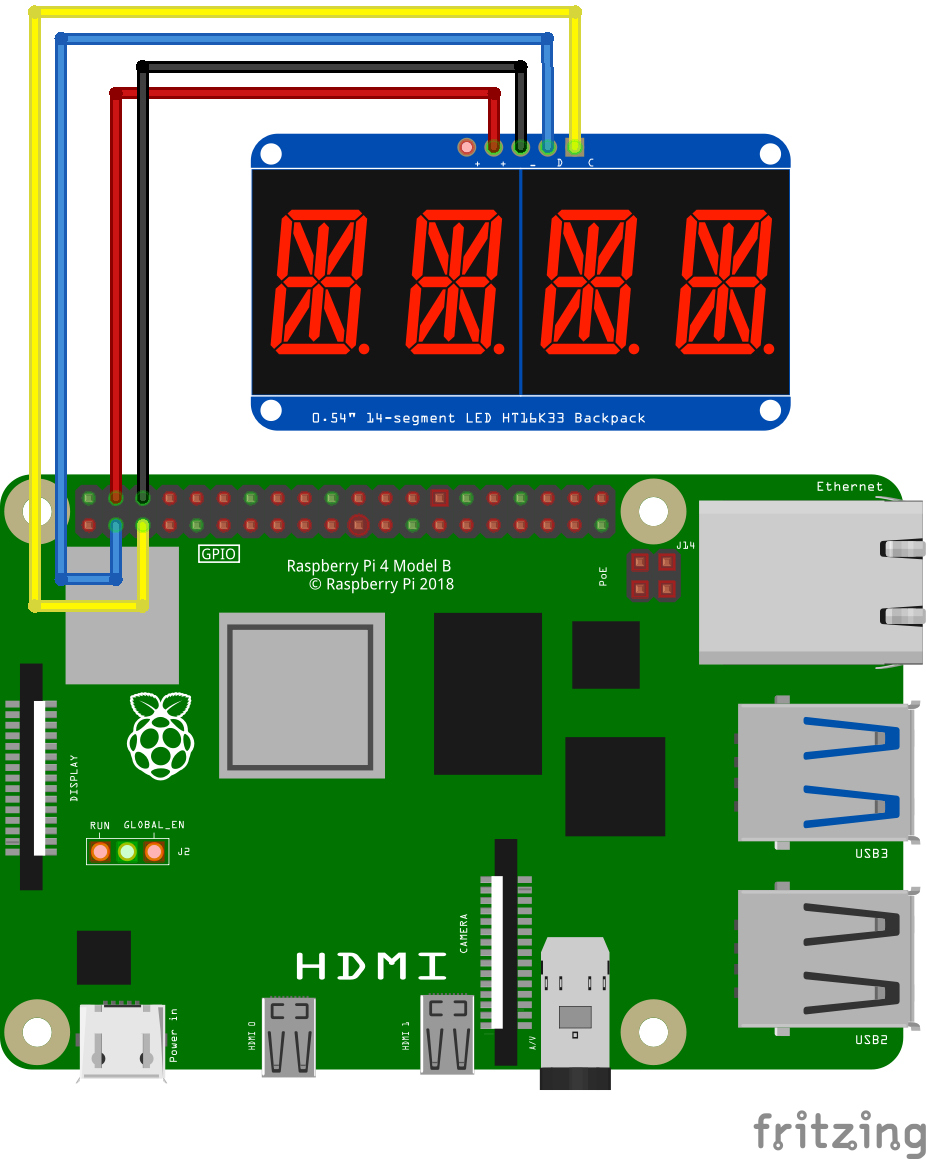
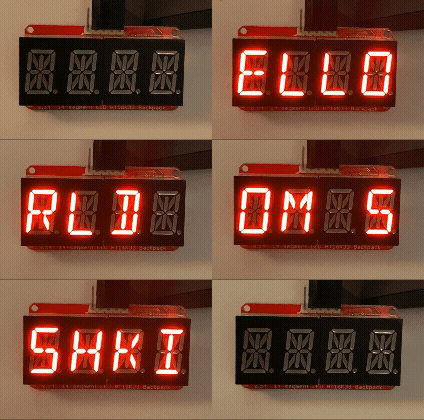
This function initializes the GPIO library for use. It should be called before any other GPIO functions.
Signatures:
void raspi_init()public static void SplashKit.RaspiInit();def raspi_init():procedure RaspiInit()Usage: {</>}
This function reads the value from the specified pin.
Parameters:
| Name | Type | Description |
|---|---|---|
| pin | Gpio Pin | The pin to read the value from. |
Return Type: Gpio Pin Value
Returns: The value read from the pin.
Signatures:
gpio_pin_value raspi_read(gpio_pin pin)public static GpioPinValue SplashKit.RaspiRead(GpioPin pin);def raspi_read(pin):function RaspiRead(pin: GpioPin): GpioPinValueUsage: {</>}
This function sets the mode of the specified pin to the specified mode.
Parameters:
| Name | Type | Description |
|---|---|---|
| pin | Gpio Pin | The pin to set the mode for. |
| mode | Gpio Pin Mode | The mode to set for the pin. |
Signatures:
void raspi_set_mode(gpio_pin pin, gpio_pin_mode mode)public static void SplashKit.RaspiSetMode(GpioPin pin, GpioPinMode mode);def raspi_set_mode(pin, mode):procedure RaspiSetMode(pin: GpioPin; mode: GpioPinMode)Usage: {</>}
This function sets the pull-up/down mode for the specified pin.
Parameters:
| Name | Type | Description |
|---|---|---|
| pin | Gpio Pin | The pin to set the pull up/down mode for. |
| pud | Pull Up Down | The pull up/down mode to set for the pin. |
Signatures:
void raspi_set_pull_up_down(gpio_pin pin, pull_up_down pud)public static void SplashKit.RaspiSetPullUpDown(GpioPin pin, PullUpDown pud);def raspi_set_pull_up_down(pin, pud):procedure RaspiSetPullUpDown(pin: GpioPin; pud: PullUpDown)Usage: {</>}
This function sets the PWM duty cycle for the specified pin.
Parameters:
| Name | Type | Description |
|---|---|---|
| pin | Gpio Pin | The pin to set the PWM duty cycle for. |
| dutycycle | Integer | The PWM duty cycle to set for the pin. |
Signatures:
void raspi_set_pwm_dutycycle(gpio_pin pin, int dutycycle)public static void SplashKit.RaspiSetPwmDutycycle(GpioPin pin, int dutycycle);def raspi_set_pwm_dutycycle(pin, dutycycle):procedure RaspiSetPwmDutycycle(pin: GpioPin; dutycycle: Integer)Usage: {</>}
This function sets the PWM frequency for the specified pin.
Parameters:
| Name | Type | Description |
|---|---|---|
| pin | Gpio Pin | The pin to set the PWM frequency for. |
| frequency | Integer | The PWM frequency to set for the pin. |
Signatures:
void raspi_set_pwm_frequency(gpio_pin pin, int frequency)public static void SplashKit.RaspiSetPwmFrequency(GpioPin pin, int frequency);def raspi_set_pwm_frequency(pin, frequency):procedure RaspiSetPwmFrequency(pin: GpioPin; frequency: Integer)Usage: {</>}
This function sets the PWM range for the specified pin. Valid values for the range are 25 - 40000
Parameters:
| Name | Type | Description |
|---|---|---|
| pin | Gpio Pin | The pin to set the PWM range for. |
| range | Integer | The PWM range to set for the pin. |
Signatures:
void raspi_set_pwm_range(gpio_pin pin, int range)public static void SplashKit.RaspiSetPwmRange(GpioPin pin, int range);def raspi_set_pwm_range(pin, range):procedure RaspiSetPwmRange(pin: GpioPin; range: Integer)Usage: {</>}
This function sets the pulse width for the specified pin.
Parameters:
| Name | Type | Description |
|---|---|---|
| pin | Gpio Pin | The pin to set the pulse width for. |
| pulsewidth | Integer | The pulse width to set for the pin. |
Signatures:
void raspi_set_servo_pulsewidth(gpio_pin pin, int pulsewidth)public static void SplashKit.RaspiSetServoPulsewidth(GpioPin pin, int pulsewidth);def raspi_set_servo_pulsewidth(pin, pulsewidth):procedure RaspiSetServoPulsewidth(pin: GpioPin; pulsewidth: Integer)This function closes SPI communication on a particular channel.
Parameters:
| Name | Type | Description |
|---|---|---|
| handle | Integer | A reference to the specific SPI connection to close. |
Return Type: Integer
Returns: A value indicating success or failure.
Signatures:
int raspi_spi_close(int handle)public static int SplashKit.RaspiSpiClose(int handle);def raspi_spi_close(handle):function RaspiSpiClose(handle: Integer): IntegerThis function opens SPI communication on a particular channel. It will return -1 if not using Raspberry Pi.
Parameters:
| Name | Type | Description |
|---|---|---|
| channel | Integer | The SPI channel to use. |
| speed | Integer | The speed of data transfer (in baud). |
| spi_flags | Integer | Optional flags for the SPI modes and settings. |
Return Type: Integer
Returns: The handle referencing this particular connection.
Signatures:
int raspi_spi_open(int channel, int speed, int spi_flags)public static int SplashKit.RaspiSpiOpen(int channel, int speed, int spiFlags);def raspi_spi_open(channel, speed, spi_flags):function RaspiSpiOpen(channel: Integer; speed: Integer; spiFlags: Integer): IntegerThis function transfers data through SPI, it sends data from sendBuf and receives it into recvBuf.
Parameters:
| Name | Type | Description |
|---|---|---|
| handle | Integer | The reference for a specific SPI connection. |
| send | String | The data to send. |
| count | Integer | The number of bytes to be transferred. |
| bytes_transfered | Integer | The number of bytes transferred (output) |
Return Type: String
Returns: The data returned from the spi transfer
Signatures:
string raspi_spi_transfer(int handle, const string &send, int count, int &bytes_transfered)public static string SplashKit.RaspiSpiTransfer(int handle, string send, int count, ref int bytesTransfered);def raspi_spi_transfer(handle, send, count, bytes_transfered):function RaspiSpiTransfer(handle: Integer; const send: String; count: Integer; var bytesTransfered: Integer): StringThis function writes the specified value to the specified pin.
Parameters:
| Name | Type | Description |
|---|---|---|
| pin | Gpio Pin | The pin to write the value to. |
| value | Gpio Pin Value | The value to write to the pin. |
Signatures:
void raspi_write(gpio_pin pin, gpio_pin_value value)public static void SplashKit.RaspiWrite(GpioPin pin, GpioPinValue value);def raspi_write(pin, value):procedure RaspiWrite(pin: GpioPin; value: GpioPinValue)Usage: {</>}
This function closes the connection to the remote Raspberry Pi and releases any resources associated with it.
Parameters:
| Name | Type | Description |
|---|---|---|
| pi | Connection | The connection object to the remote Raspberry Pi. |
Return Type: Boolean
Returns: true if the cleanup was successful, false otherwise.
Signatures:
bool remote_raspi_cleanup(connection pi)public static bool SplashKit.RemoteRaspiCleanup(Connection pi);def remote_raspi_cleanup(pi):function RemoteRaspiCleanup(pi: Connection): BooleanThis function retrieves the mode of a specific pin on a remote Raspberry Pi.
Parameters:
| Name | Type | Description |
|---|---|---|
| pi | Connection | The connection object to the remote Raspberry Pi. |
| pin | Gpio Pin | The pin to get the mode for. |
Return Type: Gpio Pin Mode
Returns: The mode of the pin.
Signatures:
gpio_pin_mode remote_raspi_get_mode(connection pi, gpio_pin pin)public static GpioPinMode SplashKit.RemoteRaspiGetMode(Connection pi, GpioPin pin);def remote_raspi_get_mode(pi, pin):function RemoteRaspiGetMode(pi: Connection; pin: GpioPin): GpioPinModeThis function initialises a connection to a remote Raspberry Pi using the specified name, host, and port.
Parameters:
| Name | Type | Description |
|---|---|---|
| name | String | The name of the connection. |
| host | String | The host address of the Raspberry Pi. |
| port | unsigned short | The port to use for the connection. |
Return Type: Connection
Returns: The connection object used to communicate with the remote Raspberry Pi.
Signatures:
connection remote_raspi_init(const string &name, const string &host, unsigned short port)public static Connection SplashKit.RemoteRaspiInit(string name, string host, ushort port);def remote_raspi_init(name, host, port):function RemoteRaspiInit(const name: String; const host: String; port: Word): ConnectionThis function reads the value from a specific pin on a remote Raspberry Pi.
Parameters:
| Name | Type | Description |
|---|---|---|
| pi | Connection | The connection object to the remote Raspberry Pi. |
| pin | Gpio Pin | The pin to read the value from. |
Return Type: Gpio Pin Value
Returns: The value read from the pin.
Signatures:
gpio_pin_value remote_raspi_read(connection pi, gpio_pin pin)public static GpioPinValue SplashKit.RemoteRaspiRead(Connection pi, GpioPin pin);def remote_raspi_read(pi, pin):function RemoteRaspiRead(pi: Connection; pin: GpioPin): GpioPinValueThis function sets the mode of a specific pin on a remote Raspberry Pi.
Parameters:
| Name | Type | Description |
|---|---|---|
| pi | Connection | The connection object to the remote Raspberry Pi. |
| pin | Gpio Pin | The pin to set the mode for. |
| mode | Gpio Pin Mode | The mode to set for the pin. |
Signatures:
void remote_raspi_set_mode(connection pi, gpio_pin pin, gpio_pin_mode mode)public static void SplashKit.RemoteRaspiSetMode(Connection pi, GpioPin pin, GpioPinMode mode);def remote_raspi_set_mode(pi, pin, mode):procedure RemoteRaspiSetMode(pi: Connection; pin: GpioPin; mode: GpioPinMode)This function sets the pull-up/down mode of a specific pin on a remote Raspberry Pi.
Parameters:
| Name | Type | Description |
|---|---|---|
| pi | Connection | The connection object to the remote Raspberry Pi. |
| pin | Gpio Pin | The pin to set the pull up/down mode for. |
| pud | Pull Up Down | The pull up/down mode to set for the pin. |
Signatures:
void remote_raspi_set_pull_up_down(connection pi, gpio_pin pin, pull_up_down pud)public static void SplashKit.RemoteRaspiSetPullUpDown(Connection pi, GpioPin pin, PullUpDown pud);def remote_raspi_set_pull_up_down(pi, pin, pud):procedure RemoteRaspiSetPullUpDown(pi: Connection; pin: GpioPin; pud: PullUpDown)This function sets the PWM duty cycle for a specific pin on a remote Raspberry Pi.
Parameters:
| Name | Type | Description |
|---|---|---|
| pi | Connection | The connection object to the remote Raspberry Pi. |
| pin | Gpio Pin | The pin to set the PWM duty cycle for. |
| dutycycle | Integer | The PWM duty cycle to set for the pin. |
Signatures:
void remote_raspi_set_pwm_dutycycle(connection pi, gpio_pin pin, int dutycycle)public static void SplashKit.RemoteRaspiSetPwmDutycycle(Connection pi, GpioPin pin, int dutycycle);def remote_raspi_set_pwm_dutycycle(pi, pin, dutycycle):procedure RemoteRaspiSetPwmDutycycle(pi: Connection; pin: GpioPin; dutycycle: Integer)This function sets the PWM frequency for a specific pin on a remote Raspberry Pi.
Parameters:
| Name | Type | Description |
|---|---|---|
| pi | Connection | The connection object to the remote Raspberry Pi. |
| pin | Gpio Pin | The pin to set the PWM frequency for. |
| frequency | Integer | The PWM frequency to set for the pin. |
Signatures:
void remote_raspi_set_pwm_frequency(connection pi, gpio_pin pin, int frequency)public static void SplashKit.RemoteRaspiSetPwmFrequency(Connection pi, GpioPin pin, int frequency);def remote_raspi_set_pwm_frequency(pi, pin, frequency):procedure RemoteRaspiSetPwmFrequency(pi: Connection; pin: GpioPin; frequency: Integer)This function sets the PWM range for a specific pin on a remote Raspberry Pi. Valid values for the range are 25 - 40000
Parameters:
| Name | Type | Description |
|---|---|---|
| pi | Connection | The connection object to the remote Raspberry Pi. |
| pin | Gpio Pin | The pin to set the PWM range for. |
| range | Integer | The PWM range to set for the pin. |
Signatures:
void remote_raspi_set_pwm_range(connection pi, gpio_pin pin, int range)public static void SplashKit.RemoteRaspiSetPwmRange(Connection pi, GpioPin pin, int range);def remote_raspi_set_pwm_range(pi, pin, range):procedure RemoteRaspiSetPwmRange(pi: Connection; pin: GpioPin; range: Integer)This function writes a specified value to a specific pin on a remote Raspberry Pi.
Parameters:
| Name | Type | Description |
|---|---|---|
| pi | Connection | The connection object to the remote Raspberry Pi. |
| pin | Gpio Pin | The pin to write the value to. |
| value | Gpio Pin Value | The value to write to the pin. |
Signatures:
void remote_raspi_write(connection pi, gpio_pin pin, gpio_pin_value value)public static void SplashKit.RemoteRaspiWrite(Connection pi, GpioPin pin, GpioPinValue value);def remote_raspi_write(pi, pin, value):procedure RemoteRaspiWrite(pi: Connection; pin: GpioPin; value: GpioPinValue)Closes all opened motor devices.
Signatures:
void close_all_motors()public static void SplashKit.CloseAllMotors();def close_all_motors():procedure CloseAllMotors()Closes and frees a motor device by name.
Parameters:
| Name | Type | Description |
|---|---|---|
| name | String | Name of the motor device. |
Signatures:
void close_motor(const string &name)public static void SplashKit.CloseMotor(string name);def close_motor_named(name):procedure CloseMotor(const name: String)Closes and frees resources for a motor device.
Parameters:
| Name | Type | Description |
|---|---|---|
| dev | Motor Device | The motor device handle. |
Signatures:
void close_motor(motor_device dev)public static void SplashKit.CloseMotor(MotorDevice dev);def close_motor(dev):procedure CloseMotor(dev: MotorDevice)Free the resources associated with a motor device.
Parameters:
| Name | Type | Description |
|---|---|---|
| dev | Motor Device | The motor device to be destroyed. |
Signatures:
void free_motor_device(motor_device dev)public static void SplashKit.FreeMotorDevice(MotorDevice dev);def free_motor_device(dev):procedure FreeMotorDevice(dev: MotorDevice)Checks if a motor device with the given name is already opened.
Parameters:
| Name | Type | Description |
|---|---|---|
| name | String | Identifier for the motor driver. |
Return Type: Boolean
Returns: true if open, false otherwise.
Signatures:
bool has_motor_device(const string &name)public static bool SplashKit.HasMotorDevice(string name);def has_motor_device(name):function HasMotorDevice(const name: String): BooleanRetrieves an existing motor device handle by name.
Parameters:
| Name | Type | Description |
|---|---|---|
| name | String | Identifier for the motor driver. |
Return Type: Motor Device
Returns: motor_device pointer or nullptr.
Signatures:
motor_device motor_named(const string &name)public static MotorDevice SplashKit.MotorNamed(string name);def motor_named(name):function MotorNamed(const name: String): MotorDeviceOpens a motor device with the specified parameters.
Parameters:
| Name | Type | Description |
|---|---|---|
| name | String | Identifier for the motor driver. |
| type | Motor Driver Type | Type of motor driver (e.g., L298N). |
| in1_pin | Gpio Pin | GPIO pin for IN1. |
| in2_pin | Gpio Pin | GPIO pin for IN2. |
| en_pin | Gpio Pin | GPIO pin for ENA. |
Return Type: Motor Device
Returns: A valid motor_device on success, or nullptr on failure.
Signatures:
motor_device open_motor(const string &name, motor_driver_type type, gpio_pin in1_pin, gpio_pin in2_pin, gpio_pin en_pin)public static MotorDevice SplashKit.OpenMotor(string name, MotorDriverType type, GpioPin in1Pin, GpioPin in2Pin, GpioPin enPin);def open_motor(name, type, in1_pin, in2_pin, en_pin):function OpenMotor(const name: String; type: MotorDriverType; in1Pin: GpioPin; in2Pin: GpioPin; enPin: GpioPin): MotorDeviceSets the motor rotation direction.
Parameters:
| Name | Type | Description |
|---|---|---|
| dev | Motor Device | The motor device handle. |
| dir | Motor Direction | Desired rotation direction. |
Signatures:
void set_motor_direction(motor_device dev, motor_direction dir)public static void SplashKit.SetMotorDirection(MotorDevice dev, MotorDirection dir);def set_motor_direction(dev, dir):procedure SetMotorDirection(dev: MotorDevice; dir: MotorDirection)Sets the PWM speed of the motor (0-1).
Parameters:
| Name | Type | Description |
|---|---|---|
| dev | Motor Device | The motor device handle. |
| speed | Double | Duty cycle speed (0..1). |
Signatures:
void set_motor_speed(motor_device dev, double speed)public static void SplashKit.SetMotorSpeed(MotorDevice dev, double speed);def set_motor_speed(dev, speed):procedure SetMotorSpeed(dev: MotorDevice; speed: Double)Stops the motor immediately (brake).
Parameters:
| Name | Type | Description |
|---|---|---|
| dev | Motor Device | The motor device handle. |
Signatures:
void stop_motor(motor_device dev)public static void SplashKit.StopMotor(MotorDevice dev);def stop_motor(dev):procedure StopMotor(dev: MotorDevice)Close all servos.
Signatures:
void close_all_servos()public static void SplashKit.CloseAllServos();def close_all_servos():procedure CloseAllServos()Closes a servo device given its name.
Parameters:
| Name | Type | Description |
|---|---|---|
| name | String | The name of the servo device to close. |
Signatures:
void close_servo(const string &name)public static void SplashKit.CloseServo(string name);def close_servo_named(name):procedure CloseServo(const name: String)Close one servo (by handle) or by name. Closes a servo device given its pointer.
Parameters:
| Name | Type | Description |
|---|---|---|
| dev | Servo Device | The servo device to close. |
Signatures:
void close_servo(servo_device dev)public void ServoDevice.Close();public static void SplashKit.CloseServo(ServoDevice dev);def close_servo(dev):procedure CloseServo(dev: ServoDevice)Returns true if a servo with this name is already open.
Parameters:
| Name | Type | Description |
|---|---|---|
| name | String | Your identifier for this servo. |
Return Type: Boolean
Returns: true if the servo is open, false otherwise.
Signatures:
bool has_servo_device(const string &name)public static bool SplashKit.HasServoDevice(string name);def has_servo_device(name):function HasServoDevice(const name: String): BooleanOpen (and initialize) a servo on the given board pin.
Parameters:
| Name | Type | Description |
|---|---|---|
| name | String | Your identifier for this servo. |
| control_pin | Gpio Pin | Board‐numbered GPIO pin for the servo signal line. |
Return Type: Servo Device
Returns: A valid servo_device, or nullptr on failure.
Signatures:
servo_device open_servo(const string &name, gpio_pin control_pin)public static ServoDevice SplashKit.OpenServo(string name, GpioPin controlPin);public ServoDevice(string name, GpioPin controlPin);def open_servo(name, control_pin):function OpenServo(const name: String; controlPin: GpioPin): ServoDeviceLook up an already‐opened servo by name.
Parameters:
| Name | Type | Description |
|---|---|---|
| name | String | Your identifier for this servo. |
Return Type: Servo Device
Returns: A valid servo_device, or nullptr if not found.
Signatures:
servo_device servo_named(const string &name)public static ServoDevice SplashKit.ServoNamed(string name);def servo_named(name):function ServoNamed(const name: String): ServoDeviceConvenience: map an angle (0…180°) into the 500…2500 µs range. This is a linear mapping, so it may not be accurate for all servos.
Parameters:
| Name | Type | Description |
|---|---|---|
| dev | Servo Device | The servo device to control. |
| angle_degrees | Double | The angle in degrees (0…180). |
Signatures:
void set_servo_angle(servo_device dev, double angle_degrees)public void ServoDevice.SetAngle(double angleDegrees);public static void SplashKit.SetServoAngle(ServoDevice dev, double angleDegrees);def set_servo_angle(dev, angle_degrees):procedure SetServoAngle(dev: ServoDevice; angleDegrees: Double)Stop sending pulses (servo will hold last position or drift). This is a convenience function that sets the pulse width to 0.
Parameters:
| Name | Type | Description |
|---|---|---|
| dev | Servo Device | The servo device to control. |
Signatures:
void stop_servo(servo_device dev)public void ServoDevice.Stop();public static void SplashKit.StopServo(ServoDevice dev);def stop_servo(dev):procedure StopServo(dev: ServoDevice)The Adc Device type is used to refer to ADC (Analog-to-Digital Converter)
devices that can be managed by the SplashKit ADC code, such as ADS7830.
ADC devices are:
- loaded with
Open Adc, - accessed using
Adc Device Namedor checked withHas Adc Device, - read using
Read Adcto retrieve analog values from specific channels, - and must be closed using
Close Adc(to release a specific ADC device) orClose All Adc(to release all loaded ADC devices).
ADC devices allow you to interface with external analog sensors or inputs, converting their signals into digital values for processing in your application.
The Motor Device type is used to refer to motor driver devices that can
be managed by the SplashKit motor driver code. Motor devices are:
-
checked with
Has Motor Deviceto see if a motor is already opened, -
accessed using
Motor Namedto retrieve an existing motor device by name, -
opened using
Open Motorwith specific parameters such as motor type and GPIO pins, -
controlled using
Set Motor Directionto set the rotation direction andSet Motor Speedto adjust the PWM speed, -
stopped immediately using
Stop Motorfor braking, -
and must be released using
Close Motor(to release a specific motor device by handle or name) orClose All Motors(to release all opened motor devices).
Motor devices allow you to control DC motors or similar devices using GPIO pins and PWM signals, enabling precise control over speed and direction.
Use Close Motor or Close All Motors to release resources associated with
motor devices when they are no longer needed.
The Servo Device type is used to refer to servo driver devices that can
be managed by the SplashKit servo driver code. Servo devices are:
Opaque handle for a single‐pin servo device.
Servo devices are:
-
checked with
Has Servo Deviceto see if a servo is already opened, -
accessed using
Servo Namedto retrieve an existing servo device by name, -
opened using
Open Servowith specific parameters such as a unique name and the GPIO pin for the servo signal line, -
controlled using
set_servo_pulsewidthto send raw pulse-width signals orSet Servo Angleto map an angle (0–180°) into the pulse-width range, -
stopped using
Stop Servoto halt signal pulses while holding the last position or allowing the servo to drift, -
and must be released using
Close Servo(to release a specific servo device by handle or name) orClose All Servos(to release all opened servo devices).
Servo devices allow you to control hobby servos or similar devices using GPIO pins and PWM signals, enabling precise control over position and movement.
Use Close Servo or Close All Servos to release resources associated with
servo devices when they are no longer needed.